

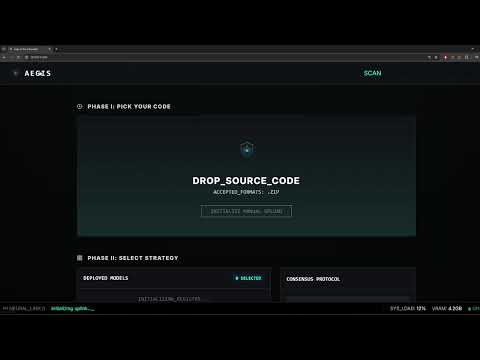
- Aegis v1: https://youtu.be/ZmT-3UpVOz8
- Legacy version: https://youtu.be/StXTwdxQyQI
Aegis is an open-source SAST framework for multi-model orchestration, bridging generative and discriminative AI for security analysis. It provides standardized infrastructure to integrate, benchmark, and compare diverse architectures—from Large Language Models (OpenAI, Anthropic, Google, Ollama) to specialized classifiers (CodeBERT, VulBERTa) via HuggingFace, and traditional ML models (sklearn).
Every model is a pluggable component within a unified registry, enabling complex workflows such as consensus-based decision making, multi-layered scanning, and cross-architecture validation.
Key Features:
- Multi-Provider Support: Ollama, HuggingFace, OpenAI, Anthropic, Google, Claude Code, sklearn
- Consensus Strategies: Union, Majority, Judge, Cascade (coming soon), Weighted (coming soon)
- Model Catalog: Pre-configured models with one-click installation
- Real-time Progress: SSE streaming for live scan updates
- Export Formats: SARIF, CSV, JSON
- Extensible: Add custom models, parsers, and providers
┌──────────────────────────────────────────────────────────────┐
│                         User Upload                          │
│                    (ZIP, Code, Git Repo)                     │
└────────────────────────┬─────────────────────────────────────┘
                         │
                         ▼
┌──────────────────────────────────────────────────────────────┐
│                    Scan Worker (Queue)                       │
│             Background processing with SSE updates           │
└────────────────────────┬─────────────────────────────────────┘
                         │
                         ▼
┌──────────────────────────────────────────────────────────────┐
│                  Pipeline Executor (Chunks)                  │
│           Parallel execution with ThreadPoolExecutor         │
└────────┬────────────────────────────────────────────┬────────┘
         │                                            │
         ▼                                            ▼
┌────────────────────┐                    ┌────────────────────┐
│   Model Registry   │                    │   Prompt Builder   │
│  (SQLite + Cache)  │                    │  (Role Templates)  │
└────────┬───────────┘                    └──────────┬─────────┘
         │                                           │
         ▼                                           ▼
┌──────────────────────────────────────────────────────────────┐
│                   Provider Layer (Adapters)                  │
│      Ollama  │  HuggingFace  │  Cloud  │  Classic ML         │
└────────────────────────┬─────────────────────────────────────┘
                         │
                         ▼
┌──────────────────────────────────────────────────────────────┐
│                    Parsers (JSON/Binary)                     │
│         Schema validation + fallback regex extraction        │
└────────────────────────┬─────────────────────────────────────┘
                         │
                         ▼
┌──────────────────────────────────────────────────────────────┐
│                  Consensus Engine (Merge)                    │
│      Union │ Majority │ Judge │ Cascade │ Weighted           │
└────────────────────────┬─────────────────────────────────────┘
                         │
                         ▼
┌──────────────────────────────────────────────────────────────┐
│              Database (Scans, Findings, History)             │
│                Export: SARIF, CSV, JSON                      │
└──────────────────────────────────────────────────────────────┘
python -m venv .venv
.venv\Scripts\activate  # Windows
# source .venv/bin/activate  # Linux/Mac

pip install -r requirements/requirements.txt
Installation Options:
- Standard (CPU):
pip install -r requirements/requirements.txt - GPU (CUDA):
pip install -r requirements/requirements-gpu.txt
Create .env file for cloud providers:
OPENAI_API_KEY=sk-...
ANTHROPIC_API_KEY=sk-ant-...
GOOGLE_API_KEY=AIza...python app.pyOpen: http://localhost:5000
| Strategy | Description | Best For |
|---|---|---|
| Union | Combines all findings from all models | Maximum coverage |
| Majority | Only findings detected by 2+ models | Reducing false positives |
| Judge | A judge model evaluates and merges findings | High-precision analysis |
| Cascade (coming soon) | Two-pass: fast triage → deep scan on flagged files | Large codebases |
| Weighted (coming soon) | Confidence-weighted voting | Balanced precision/recall |
Pre-configured models available in the UI catalog:
| Model | Type | Role | Hardware |
|---|---|---|---|
| CodeBERT Insecure Detector | Classifier | Triage | CPU |
| CodeBERT PrimeVul-BigVul | Classifier | Triage | CPU |
| VulBERTa MLP Devign | Classifier (C/C++) | Triage | CPU |
| UnixCoder PrimeVul-BigVul | Classifier | Triage | CPU |
| Qwen 2.5 0.5B Instruct | Generative | Triage/Deep | CPU |
| CodeAstra 7B | Generative | Deep Scan | GPU |
| Phi-3.5 Mini Instruct | Generative | Deep Scan | GPU |
| DeepSeek Coder V2 Lite | Generative | Deep Scan | GPU |
| StarCoder2 15B Instruct | Generative | Deep Scan | GPU |
| Model | Provider | Role |
|---|---|---|
| GPT-4o | OpenAI | Deep Scan, Judge |
| GPT-4o Mini | OpenAI | Triage, Deep Scan |
| Claude Sonnet 4 | Anthropic | Deep Scan, Judge |
| Gemini 1.5 Pro | Deep Scan | |
| Gemini 1.5 Flash | Triage, Deep Scan |
| Model | Role |
|---|---|
| Qwen 2.5 Coder 7B | Deep Scan |
| Llama 3.2 | Deep Scan |
| CodeLlama 7B | Deep Scan |
| Mistral 7B | Deep Scan |
| DeepSeek Coder 6.7B | Deep Scan |
Aegis v1.2 introduces agentic security scanning, a new provider category that invokes AI coding agents as subprocesses for deep SAST analysis. Agentic models pipe code with a JSON schema constraint and a security-focused system prompt, producing structured findings that enter the consensus engine like any other model.
| Model | Variant | Role |
|---|---|---|
| Claude Code Security (Quick) | Sonnet | Triage, Deep Scan |
| Claude Code Security (Deep) | Opus | Deep Scan, Judge |
| Model | Type | Role | Hardware |
|---|---|---|---|
| Kaggle RF C-Functions | Random Forest (C/C++) | Triage | CPU |
- Install Ollama: https://ollama.ai
- Pull a model:
ollama pull llama3.2 - In Aegis UI → Models → OLLAMA → Click Discover
- Click Register on detected models
Recommended: llama3.2, qwen2.5-coder:7b, codellama:7b
- In Aegis UI → Models → HUGGING FACE
- Browse the Model Catalog for pre-configured models
- Click Install to download and register
- In Aegis UI → Models → CLOUD
- Select provider and model from the catalog
- Click Add (requires API key in
.env)
- In Aegis UI → Models → ML MODELS
- Click Install on available presets
- Model downloads automatically
Add new HuggingFace models to the catalog in aegis/models/catalog.py:
HF_MY_MODEL = {
    "catalog_id": "my_model",
    "category": CatalogCategory.HUGGINGFACE,
    "display_name": "My Custom Model",
    "description": "Description of what this model does",
    "provider_id": "huggingface",
    "model_type": "hf_local",
    "model_name": "organization/model-name",  # HuggingFace model ID
    "task_type": "text-classification",  # or "text-generation"
    "roles": ["triage"],  # triage, deep_scan, judge
    "parser_id": "hf_classification",  # Parser to use
    "parser_config": {
        "positive_labels": ["LABEL_1", "vulnerable"],
        "negative_labels": ["LABEL_0", "safe"],
        "threshold": 0.5,
    },
    "hf_kwargs": {
        "trust_remote_code": False,
    },
    "generation_kwargs": {
        "max_new_tokens": 512,
        "temperature": 0.1,
    },
    "size_mb": 500,
    "requires_gpu": False,
    "tags": ["classifier", "triage"],
}

# Add to MODEL_CATALOG list
MODEL_CATALOG.append(HF_MY_MODEL)Add cloud model presets in aegis/models/catalog.py:
CLOUD_MY_MODEL = {
    "catalog_id": "my_cloud_model",
    "category": CatalogCategory.CLOUD,
    "display_name": "My Cloud Model",
    "description": "Cloud LLM for security analysis",
    "provider_id": "openai",  # openai, anthropic, google
    "model_type": "openai_cloud",  # openai_cloud, anthropic_cloud, google_cloud
    "model_name": "gpt-4o-mini",  # Provider's model name
    "task_type": "text-generation",
    "roles": ["deep_scan", "judge"],
    "parser_id": "json_schema",
    "generation_kwargs": {
        "max_tokens": 2048,
        "temperature": 0.1,
    },
    "requires_api_key": True,
    "tags": ["cloud", "llm", "deep_scan"],
}- Train and save your model as a Pipeline:
from sklearn.pipeline import Pipeline
from sklearn.feature_extraction.text import TfidfVectorizer
from sklearn.ensemble import RandomForestClassifier
import joblib

pipeline = Pipeline([
    ('tfidf', TfidfVectorizer(max_features=5000)),
    ('clf', RandomForestClassifier(n_estimators=100))
])
pipeline.fit(X_train, y_train)
joblib.dump(pipeline, 'my_model.pkl')-
Host the model (e.g., GitHub Releases)
-
Add to catalog in
aegis/models/catalog.py:
ML_MY_MODEL = {
    "catalog_id": "my_ml_model",
    "category": CatalogCategory.CLASSIC_ML,
    "display_name": "My ML Classifier",
    "description": "Custom sklearn model for vulnerability detection",
    "provider_id": "tool_ml",
    "model_type": "tool_ml",
    "model_name": "my_ml_model",
    "tool_id": "sklearn_classifier",
    "task_type": "classification",
    "roles": ["triage"],
    "parser_id": "tool_result",
    "settings": {
        "model_url": "https://github.com/user/repo/releases/download/v1/my_model.pkl",
        "threshold": 0.5,
    },
    "size_mb": 50,
    "requires_gpu": False,
    "tags": ["ml", "sklearn", "triage"],
}Create a new parser in aegis/parsers/:
# aegis/parsers/my_parser.py
from aegis.parsers.base import BaseParser
from aegis.models.schema import ParserResult, FindingCandidate

class MyParser(BaseParser):
    """Custom parser for specific model output format."""

    parser_id = "my_parser"

    def parse(self, raw_output: str, context: dict) -> ParserResult:
        """Parse model output into findings."""
        findings = []

        # Your parsing logic here
        # Extract vulnerabilities from raw_output

        for vuln in extracted_vulns:
            findings.append(FindingCandidate(
                file_path=context.get("file_path", "unknown"),
                line_start=vuln.get("line", 1),
                line_end=vuln.get("line", 1),
                snippet=vuln.get("code", ""),
                title=vuln.get("title", "Vulnerability"),
                category=vuln.get("category", "security"),
                cwe=vuln.get("cwe"),
                severity=vuln.get("severity", "medium"),
                description=vuln.get("description", ""),
                recommendation=vuln.get("fix", ""),
                confidence=vuln.get("confidence", 0.5),
            ))

        return ParserResult(
            findings=findings,
            raw_output=raw_output,
        )
Register the parser in aegis/parsers/__init__.py:
from aegis.parsers.my_parser import MyParser

PARSER_REGISTRY = {
    # ... existing parsers
    "my_parser": MyParser,
}aegis/
├── api/ # REST API routes
├── consensus/ # Multi-model merging strategies
├── database/ # SQLite repositories
├── models/ # Model registry and catalog
│ ├── catalog.py # Pre-configured model definitions
│ ├── registry.py # Model registration (database)
│ └── runtime.py # Model loading + caching
├── parsers/ # Output parsers (JSON, classification, etc.)
├── providers/ # Provider adapters (Ollama, HF, Cloud)
├── services/ # Scan worker + background queue
├── tools/ # ML tool plugins (sklearn, regex)
├── static/ # Web UI assets
└── templates/ # Jinja2 HTML templates
config/
├── models.yaml # Legacy model presets
└── pipelines/ # Pipeline definitions
data/aegis.db # SQLite database (auto-created)
HuggingFace models fail to load:
- Ensure 8GB+ RAM (16GB recommended)
- Use 4-bit quantization in model settings
- Check CUDA:
python -c "import torch; print(torch.cuda.is_available())"
Ollama models not detected:
- Verify Ollama is running:
curl http://localhost:11434/api/tags - Set custom URL:
OLLAMA_BASE_URL=http://host:11434
sklearn model errors:
- Ensure model is saved as a Pipeline (includes vectorizer)
- Check sklearn version compatibility
Scans stuck at "Running":
- Check browser console for SSE errors
- First scan may take 1-2 minutes (model loading)
- Check
logs/aegis.log
Cloud API rate limits:
- Use Ollama/HF for high-throughput scanning
- Increase delay between requests
See API_REFERENCE.md for detailed endpoint documentation.
MIT License - see LICENSE
Pull requests welcome! Please:
- Follow existing code style (PEP 8)
- Add type hints to new functions
- Test with multiple providers